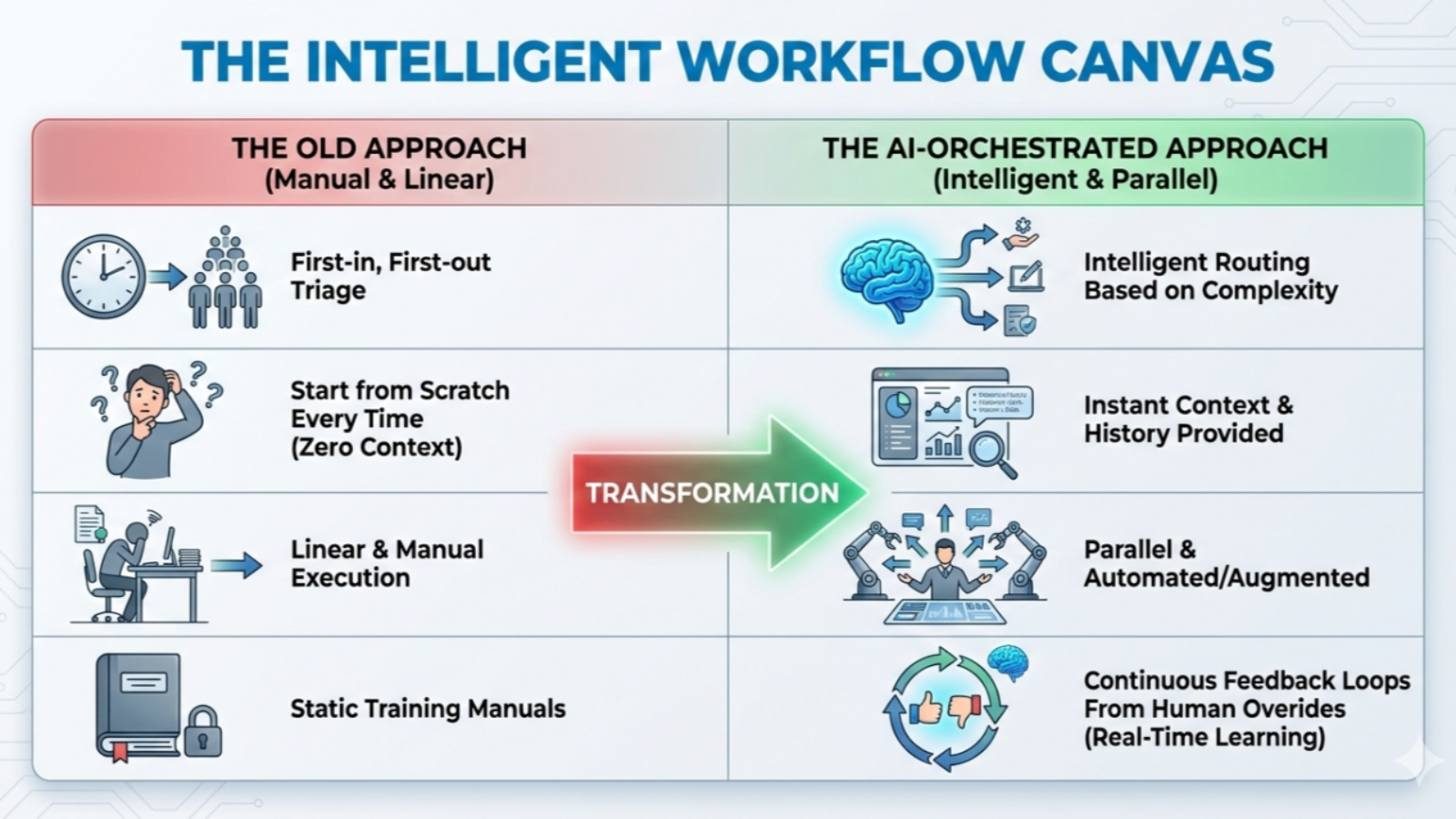
In today’s fast-paced digital world, time is your most valuable asset. Yet, professionals across almost every industry spend countless hours each week on repetitive, manual tasks—data entry, routing customer inquiries, scheduling appointments, and sorting emails.
What if you could delegate those tedious tasks to a tireless, intelligent assistant that works 24/7 with zero error?
Welcome to the world of AI Workflow Automation.
AI-powered workflow automation is no longer just a luxury reserved for tech giants like Google or Amazon; it has become an accessible, essential tool for small businesses, freelancers, startups, and enterprise teams alike. In this comprehensive beginner’s guide, we will unpack what AI workflow automation is, how it differs from traditional automation, the immense benefits it brings, practical examples, and a step-by-step framework to help you build your very first automated workflow today.
What is AI Workflow Automation?
To understand AI workflow automation, let’s first break down the concept into two fundamental parts: Workflow Automation and Artificial Intelligence (AI).
- A Workflow is a defined sequence of repeatable tasks or processes that move a piece of data, a project, or a service from start to finish (e.g., receiving an invoice, approving it, and sending payment).
- AI Workflow Automation refers to using software and rule-based logic to execute these tasks without human intervention (e.g., “If a user fills out this form, send them a confirmation email”).
- Artificial Intelligence (AI) adds cognitive capabilities—such as Natural Language Processing (NLP), Machine Learning (ML), and Computer Vision—to these systems.
Therefore, AI Workflow Automation is the practice of combining smart AI algorithms with traditional automation tools to create systems that can not only carry out actions, but also think, analyze, learn, and make decisions like a human operator.
Traditional Automation vs. AI Workflow Automation: What’s the Difference?
Many people ask: “Isn’t automation just set-it-and-forget-it software rules?”
Traditional automation and AI automation share the same goal—saving time—but their capabilities are vastly different.
| Feature | Traditional Automation | AI-Powered Workflow Automation |
| Logic Type | Rule-based (“If X happens, then do Y”) | Cognitive & Adaptive (Learns from data patterns) |
| Data Handled | Structured Data only (e.g., CSV files, database fields) | Unstructured Data (e.g., raw text, images, voice notes, PDFs) |
| Decision Making | Strict and rigid; breaks if an exception occurs | Dynamic; can interpret context and handle edge cases |
| User Interaction | Requires exact inputs | Can understand human language via chatbots and LLMs |
| Example | Auto-forwarding an email tagged “Urgent” | Reading an email, understanding the sentiment, writing a draft reply, and tagging it appropriately |
Think of traditional automation as a train: it runs extremely fast, but only along pre-laid tracks. AI workflow automation is like a self-driving car: it can navigate complex roads, make real-time decisions, detour around traffic, and get you to your destination safely.
Why You Can No Longer Ignore AI Workflow Automation
AI Workflow Automation has moved from an emerging technology concept to a practical business strategy. The combination of generative AI models, automation platforms, APIs, and cloud applications allows businesses and individuals to automate tasks that previously required significant manual effort. Instead of spending hours processing information, updating systems, responding to routine requests, or organizing data, teams can create intelligent workflows that handle these activities automatically.
The growing accessibility of AI means that AI Workflow Automation is no longer limited to large technology companies with specialized engineering teams. Modern no-code and low-code platforms allow marketers, entrepreneurs, managers, and small businesses to build useful automated processes with minimal technical knowledge.
Why You Can No Longer Ignore AI Workflow Automation
There are several reasons organizations are rapidly adopting AI Workflow Automation. The biggest advantages involve saving time, reducing repetitive work, improving consistency, and allowing employees to focus on higher-value activities.
1. Reclaim Hours of Wasted Productivity
Knowledge workers often spend a significant portion of their day handling repetitive administrative activities. Data processing, content tagging, status updates, email management, and manual reporting can consume valuable working hours.
With AI Workflow Automation, businesses can delegate many of these repetitive processes to software. Employees can then spend more time on strategic initiatives, creative work, customer relationships, problem-solving, and other activities that require human judgment.
The goal is not simply to make employees work faster. It is to remove unnecessary work so people can concentrate on work that creates greater value.
2. Reduce Repetitive Errors
Human fatigue can contribute to data-entry mistakes, missed follow-ups, inconsistent records, and administrative errors. Automated workflows can perform structured tasks consistently according to predefined rules.
For example, an automated workflow can copy information from a form into a database, categorize incoming requests, and notify the appropriate team member without requiring someone to repeat the same steps manually.
However, automation is not automatically error-free. Poor instructions, incorrect data, or poorly designed processes can still produce incorrect results. This is why testing and monitoring are essential components of AI Workflow Automation.
3. Support Business Scalability
Traditional processes often require additional staff as workload increases. An automated workflow can process significantly larger volumes without requiring every individual task to be performed manually.
For example, a lead-processing workflow can collect customer information, enrich the record, categorize the lead, and notify a sales representative regardless of whether the business receives a few inquiries or thousands of inquiries.
This scalability makes AI Workflow Automation particularly useful for growing businesses that want to handle increasing workloads without creating unnecessary administrative bottlenecks.
4. Enable 24/7 Operations
Unlike human employees, automated software does not need to sleep or take breaks. A properly configured workflow can continue processing information outside normal business hours.
This can be useful for:
- Capturing leads from different time zones
- Sending automated confirmations
- Processing overnight data
- Updating databases
- Monitoring incoming requests
- Triggering alerts for urgent issues
As a result, AI Workflow Automation can help organizations maintain continuous operational processes while employees focus on higher-priority work.
5. Improve Customer Experience
Customers increasingly expect fast and convenient interactions. Automated workflows can acknowledge inquiries, categorize support requests, route customers to the appropriate department, and trigger personalized follow-ups.
For example, an AI system can analyze an incoming support request, determine its category, identify its urgency, and send it to the correct team.
When carefully designed, AI Workflow Automation can reduce response delays and make customer interactions more consistent.
Common Use Cases Across Key Departments
One of the most valuable characteristics of AI Workflow Automation is its flexibility. The same underlying concept can be applied to marketing, sales, customer service, human resources, finance, operations, and other departments.
1. Marketing and Content Creation
Marketing teams can use AI to automate repetitive content and campaign processes.
Social Media Automation
An automated marketing workflow can monitor relevant industry information, summarize important developments, generate draft social posts, create supporting visual concepts, and prepare content for scheduling.
A human marketer can review the content before publication, ensuring that brand voice, accuracy, and strategy remain under human control.
Lead Nurturing
AI can analyze website activity, identify potential customer interests, generate personalized email drafts, and trigger follow-up sequences based on engagement.
This approach can make lead management more organized while reducing repetitive manual tasks.
2. Sales and Lead Management
Sales teams can use AI Workflow Automation to reduce administrative workloads.
Lead Scoring and Enrichment
When a prospect submits a form, an automated workflow can collect company information, enrich the customer record, assign a lead score, and notify the appropriate sales representative.
This can help sales teams spend more time communicating with prospects rather than manually researching every lead.
Follow-Up Automation
After a sales meeting, AI can analyze a transcript, identify action items, prepare a follow-up email draft, and update the CRM.
A human salesperson can review the message before sending it.
3. Customer Support
Customer service is another major application for AI Workflow Automation.
Smart Ticket Routing
AI can analyze incoming support requests and categorize them based on topics such as billing, technical issues, account problems, or product questions.
Sentiment analysis can also help identify potentially frustrated customers who may require faster human attention.
Tier-One Support
AI agents can potentially handle simple requests such as frequently asked questions, basic account guidance, or routine information retrieval when appropriate system integrations are available.
More complicated or sensitive issues should be escalated to human representatives.
4. Human Resources and Recruiting
Recruitment teams often process large amounts of repetitive information.
An automated recruitment workflow can organize applications, extract relevant qualifications, compare information against predefined job requirements, and help coordinate interviews.
For onboarding, automation can send welcome information, assign training materials, create accounts, and answer common administrative questions.
Because employment decisions can significantly affect people, organizations should apply appropriate human oversight and avoid relying exclusively on automated scoring.
5. Finance and Accounting
Finance departments can use AI Workflow Automation for document processing and administrative tasks.
OCR technology can extract information from invoices and receipts, while AI can help identify relevant fields and organize information for accounting systems.
For example, a workflow might:
Receive Invoice → Extract Data → Validate Information → Match Purchase Order → Update Accounting System
Automating these steps can reduce manual data entry, but financial records should always be validated before important transactions are completed.
Popular No-Code and Low-Code Tools
You do not need advanced programming skills to begin experimenting with AI Workflow Automation. Visual workflow platforms make it possible to connect applications and AI services through configurable steps.
1. Zapier
Best for: Beginners and teams seeking straightforward application integrations.
Zapier connects numerous applications and allows users to create trigger-and-action workflows. AI steps can be inserted into workflows to classify information, summarize content, generate text, or extract structured data.
2. Make
Best for: Users who need visual, multi-step, and conditional workflows.
Make provides a visual workflow environment where users can connect applications, transform information, create branching logic, and build more sophisticated processes.
3. n8n
Best for: Technical users, developers, and organizations seeking greater control.
n8n supports complex workflows and can be self-hosted. This can provide organizations with additional control over infrastructure and data handling, depending on how the system is configured.
4. Microsoft Power Automate
Best for: Organizations already using Microsoft’s business ecosystem.
Power Automate can connect Microsoft applications and business services while supporting workflow automation, document processing, and other enterprise processes.
How to Build Your First AI Workflow
A practical AI Workflow Automation project does not need to be complicated. Start with a process that is repetitive, clearly defined, and relatively low risk.
The Five-Step Automation Flywheel
1. Identify → 2. Map and Clean → 3. Select Tools → 4. Build and Test → 5. Monitor
Step 1: Identify the Right Process
Do not attempt to automate your entire business immediately.
Look for tasks that:
- Happen frequently
- Follow predictable steps
- Involve repetitive information processing
- Have a clearly defined outcome
- Consume unnecessary employee time
For example, processing customer feedback emails is a strong starting point because the workflow can classify messages, summarize feedback, and record results.
Step 2: Map the Workflow Manually
Before building AI Workflow Automation, document how the current process works.
Use three basic components:
Trigger: What starts the workflow?
AI Action: What analysis or decision does AI perform?
Destination Action: Where should the result go?
For example:
New Customer Email → AI Sentiment Analysis → Add Result to Spreadsheet
Mapping the process first makes it easier to identify unnecessary steps and potential problems.
Step 3: Choose Your Tools
Select an automation platform based on your technical requirements, budget, integrations, and data-security needs.
You may connect services such as Gmail, Google Sheets, Slack, CRM platforms, AI APIs, and project management applications.
Only request the permissions the workflow actually requires.
Step 4: Write Precise AI Prompts
The quality of an AI workflow depends heavily on the instructions provided to the model.
A weak instruction might be:
“Summarize this email.”
A stronger instruction would define the role, output categories, required format, and decision rules.
For example:
“Read the customer email. Categorize sentiment as POSITIVE, NEUTRAL, or NEGATIVE. Identify the main issue in one sentence. Return the result in structured JSON.”
Clear prompts make automated outputs easier to process and validate.
Step 5: Test, Refine, and Monitor
Before activating AI Workflow Automation in a production environment, test it using historical examples and artificial test cases.
Consider unusual situations:
- What happens if the email is in another language?
- What happens if important information is missing?
- What happens if an attachment cannot be processed?
- What happens if the AI produces an unexpected output?
- What happens if an external application becomes unavailable?
Continue refining the workflow until it produces reliable results.
Best Practices and Common Pitfalls
Maintain a Human-in-the-Loop
Do not completely automate high-risk decisions at the beginning. A human approval stage can be particularly important for customer communications, financial decisions, employment processes, and other sensitive activities.
For example, let AI prepare a customer response while requiring a team member to review and approve it.
Prioritize Data Privacy and Security
Be careful about the information sent to AI systems. Sensitive personal information, financial records, confidential business information, and proprietary data require appropriate safeguards.
Before implementing AI Workflow Automation, review the security practices, permissions, retention policies, and compliance requirements of every service involved.
Beware of AI Hallucinations
Generative AI can sometimes produce incorrect information that sounds convincing. This is particularly important when automated workflows process factual or business-critical information.
Use reliable databases and source documents as the foundation for important decisions, and introduce validation steps where necessary.
Avoid Over-Engineering
A complicated workflow is not necessarily a better workflow. Building a massive automation with dozens of interconnected steps can make maintenance difficult.
Instead, create smaller, modular workflows that each perform a clearly defined task.
The Future of AI Workflows: Autonomous AI Agents
The next stage of AI Workflow Automation involves autonomous AI agents.
Traditional automation follows predefined instructions:
Do A → Do B → Do C
AI agents can work toward a broader objective:
Goal → Plan → Use Tools → Evaluate Results → Adjust
Instead of requiring every possible step to be manually programmed, an agent can potentially determine which actions are necessary to accomplish a defined objective.
For example, an organization could provide an AI agent with a goal related to customer retention. The agent might analyze customer data, identify relevant patterns, prepare recommendations, and interact with connected tools according to predefined permissions.
However, autonomous systems also introduce additional risks. Organizations need appropriate access controls, monitoring, approval mechanisms, and clear boundaries before allowing AI agents to perform consequential actions.
Learning AI Workflow Automation today provides a useful foundation for understanding these more advanced systems.
Conclusion: Start Building Today
AI Workflow Automation is not about eliminating human creativity or reducing the value of employees. Its primary purpose is to remove repetitive, mechanical, and administrative burdens so people can focus on work that requires creativity, judgment, empathy, and strategic thinking.
You do not need to transform your entire organization overnight. Choose one repetitive task that causes unnecessary frustration. It might be copying information between spreadsheets, preparing routine follow-up emails, organizing documents, or categorizing customer requests.
Spend a short amount of time mapping the process, selecting an appropriate automation platform, creating a structured AI prompt, and testing the workflow.
Once the first workflow works reliably, measure the results and identify the next opportunity.
The future of AI Workflow Automation will involve increasingly intelligent systems that can understand context, use connected tools, and adapt to changing conditions. The organizations and professionals that learn how to combine these capabilities with thoughtful human oversight will be better positioned to build efficient, scalable, and sustainable workflows.
Add a Comment