Every small business owner knows the feeling of wearing too many hats.
In a single afternoon, you might step into the role of head of sales, customer service representative, inventory manager, data entry clerk, and chief marketing officer. While wearing these hats is often a point of pride in the early stages of an enterprise, it quickly becomes the primary bottleneck to sustainable growth. Fortunately, AI automation for small businesses is changing the game by taking over repetitive administrative tasks, freeing you up to focus on scaling your vision.
When your calendar is dominated by low-leverage administrative work—chasing invoices, manually typing lead details into spreadsheets, drafting repetitive emails, and answering the same customer inquiries over and over—you are left with virtually zero time for high-leverage strategic thinking.
This operational bottleneck is why AI automation has shifted from an enterprise luxury to an essential survival tool for small-to-medium businesses (SMBs).
Small business adoption of AI workflow automation has surged past 38%, with lean teams leveraging automated systems to achieve the bandwidth of organizations triple their size. Beyond saving money, the primary goal is reclaiming time—the single non-renewable asset every business owner trades daily.
This guide walks through how AI automation works, where it delivers the highest return on investment, how to implement it without a technical background, and how to avoid the common pitfalls that cost small businesses money.
AI Automation for Small Businesses:Rules, Intelligence, Workflows & Implementation
1. AI Automation for Small Businesses: Intelligence
: Rules vs. Intelligence
Small businesses are increasingly using technology to reduce repetitive work, improve productivity, and create more consistent workflows. However, traditional automation and AI-powered automation are not the same. Traditional systems usually follow predefined instructions, while AI-powered systems can interpret information, recognize patterns, process natural language, and assist with business decisions. Small Business AI Automation combines automation with AI capabilities to help businesses manage both structured and unstructured tasks more efficiently.
Traditional Automation: Rule-Based Workflows
Traditional automation works through clearly defined rules. A workflow typically follows an “if this happens, then do that” structure. For example, when a customer submits an online form, the system may automatically send a confirmation email.
How Traditional Automation Works
A traditional workflow depends on predictable inputs and predefined actions. If the information entering the system matches the expected conditions, the automation performs the assigned task. This makes traditional automation useful for repetitive processes such as sending notifications, updating spreadsheets, creating records, or moving information between applications.
AI Automation for Small Businesses:
The main limitation is that traditional automation generally struggles with information that does not follow a predictable format. An unusual customer question, a lengthy email, or a document with inconsistent information may require human interpretation. This is where AI-powered workflows can provide additional capabilities.
AI-Powered Automation:1. Demystifying : Rules vs. Intelligence
From Rules to Intelligence
AI automation adds technologies such as natural language processing, machine learning, and generative AI to business workflows. Instead of simply following a fixed instruction, an AI system can analyze information and determine what type of action may be appropriate according to predefined business rules.
Processing Unstructured Business Information
Businesses receive information through emails, documents, customer messages, images, audio recordings, and other formats. AI Automation for Small Businesses: can help process this information by extracting important details, summarizing content, categorizing requests, and preparing information for another business application.
Connecting Multiple Business Processes
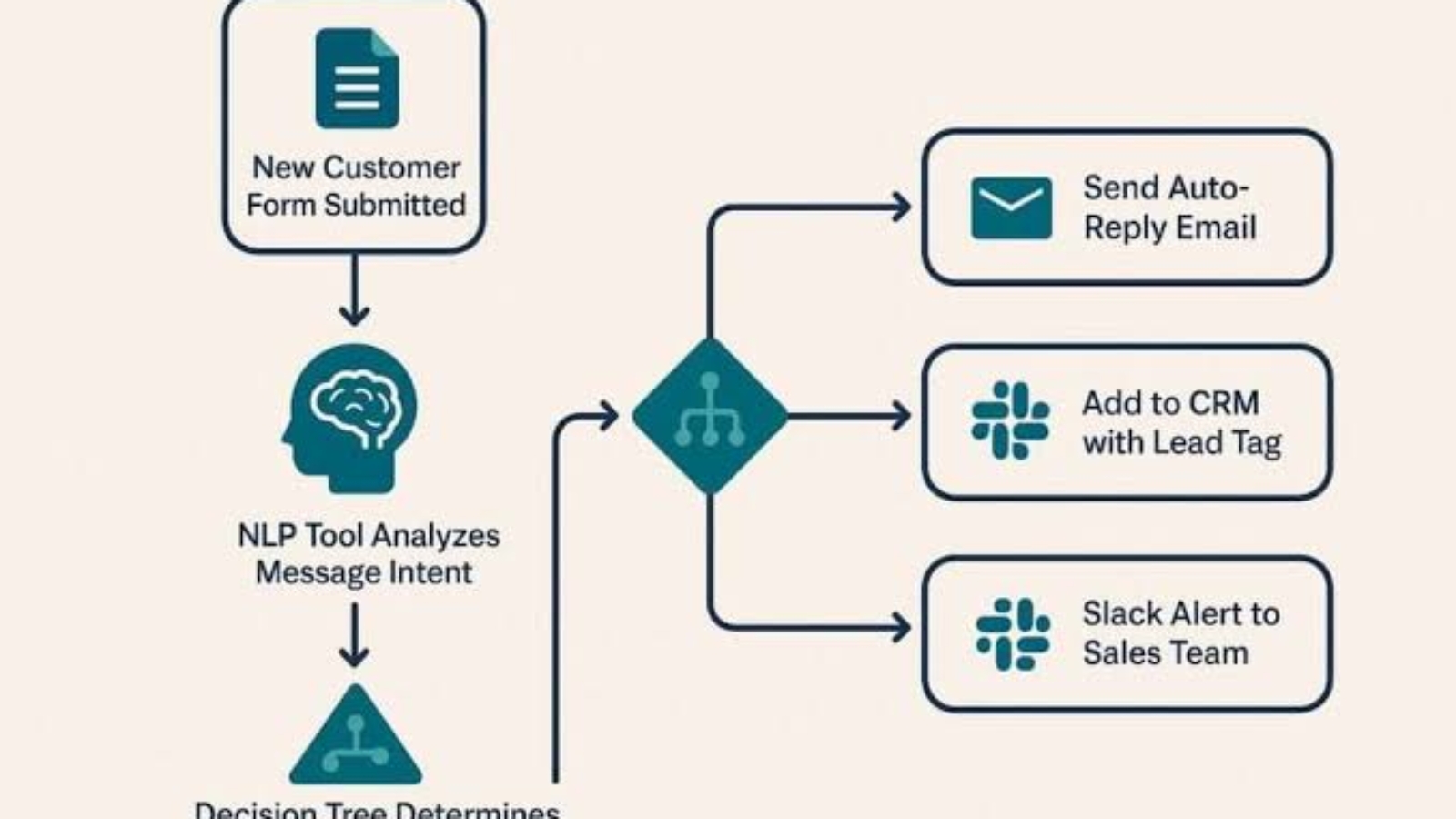
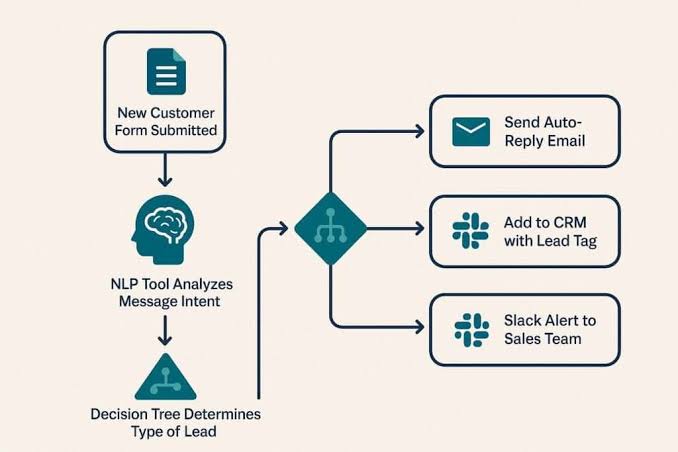
An AI-powered workflow can connect several steps into one process. For example, a customer email can be analyzed, categorized, summarized, entered into a CRM, and routed to the appropriate employee. This reduces the need for employees to manually transfer information between different systems.
2. The Real Cost of Manual Work in Small Businesses
Manual administrative work can consume a significant amount of time in a small business. Tasks such as entering customer information, organizing emails, preparing documents, updating records, and sending follow-up messages may appear small individually, but their combined effect can become substantial.
Understanding the Hidden Cost of Repetitive Tasks
Many businesses calculate direct expenses such as software subscriptions, salaries, and office costs while overlooking the time employees spend performing repetitive activities. This hidden productivity cost can reduce the amount of time available for customer service, sales, strategy, and creative work.
Calculating Lost Productivity
For example, imagine a five-person business where each employee spends two hours per day on repetitive administrative activities. Together, the team could spend approximately 50 hours every week on these tasks. Over a 50-week working year, that could represent around 2,500 hours of administrative work.
The actual financial impact depends on employee compensation, task complexity, and how much of the work can realistically be automated. Therefore, businesses should calculate their own costs before deciding which workflows to automate.
How Small AI Automation for Small Businesses:
Small Business AI Automation can reduce repetitive administrative steps by automatically processing appropriate tasks. Employees can then spend more time on activities that require communication, creativity, judgment, and business knowledge.
Moving Employees Toward Higher-Value Work
The purpose of automation is not necessarily to remove people from the workflow. Instead, businesses can use automation to handle repetitive tasks while employees focus on higher-value responsibilities. Human involvement remains important for decisions that require context, accountability, or professional judgment.
3. Five AI Automation for Small Businesses:
Businesses do not need to automate every process immediately. A AI Automation for Small Businesses is to identify repetitive workflows that consume significant time and have clear inputs and outputs.
1. Lead Qualification and Speed-to-Lead
Lead management is an important opportunity for AI Automation for Small Businesses because customer inquiries may arrive at any time. A slow response can create delays in the sales process and increase the amount of manual follow-up required by employees.
Automating Lead Qualification
With Small Business AI Automation, an incoming inquiry can be analyzed to identify the customer’s requirements, classify the type of request, extract important information, and organize the lead for further action.
Manual vs. Automated Lead Management
In a manual workflow, an employee may discover AI Automation for Small Businesses, read the message, determine what the customer needs, update the CRM, and prepare a response. An automated workflow can perform some of these repetitive steps automatically while sending complex or high-value inquiries to a human employee.
2. Intelligent Customer Support
Customer support is another useful application of AI automation. Businesses regularly receive questions about products, services, appointments, pricing, policies, and order information.
Automating Routine Customer Questions
Small Business AI Automation can help answer common questions using approved company information. An AI system can search relevant documentation, identify the customer’s question, and prepare an appropriate response.
Human Escalation for Complex Issues
Not every customer interaction should be fully automated. Sensitive complaints, unusual requests, refunds, legal matters, or situations requiring business judgment can be transferred to a human employee.
This combination allows automation to handle suitable repetitive questions while employees remain responsible for situations requiring judgment.
3. Financial Management and Invoicing
Financial administration often includes repetitive document AI Automation for Small Businesses activities. Employees may need to review invoices, receipts, payment records, and other financial documents.
Automating Invoice Data Processing
Small Business AI Automation can assist with extracting information such as invoice numbers, dates, amounts, and vendor details from supported documents. The extracted information can then be prepared for review or transferred into compatible accounting systems.
Automating Payment Reminders
Businesses can also create workflows that monitor payment status and prepare reminders according to predefined rules. Human approval can be added before important financial communications are sent.
Automation should complement financial review rather than replace appropriate accounting controls.
4. Content Repurposing and Marketing
Small businesses often create content for websites, newsletters, social media, videos, and other channels. Creating every version manually can require substantial time.
Turning One Idea Into Multiple Content Assets
A business can build an AI-assisted content workflow that AI Automation for Small Businesses one original recording or article and creates multiple drafts from it.
For example, a workflow could:
- Record a video or AI Automation for Small Businesses
- Transcribe the recording.
- Organize the transcript into an AI Automation for Small Businesses
- Create a newsletter draft.
- Generate social media drafts.
- Send the content to a human reviewer.
- Schedule approved content.
Maintaining Brand Consistency
Human review is important because AI Automation for Small Businesses unsuitable wording, or inconsistent brand messaging. A review stage allows employees to verify facts, tone, claims, and formatting before publication.
Small Business AI Automation can therefore accelerate content production while keeping final editorial responsibility with the business.ortant because AI-generated content should be checked for accuracy, tone, context, and originality before publication.
5. Internal Knowledge AI Automation for Small Businesses
Employees often spend time searching for internal AI Automation for Small Businesses or trying to remember decisions made during previous meetings.
AI meeting tools can transcribe conversations, create summaries,AI Automation for Small Businesses action items, and organize important information. Internal knowledge systems can also allow employees to search company documentation using natural-language questions.
Small business AI automation can connect these processes with project-management tools so that approved action items can move directly into an appropriate workflow.
This can make internal communication more organized and reduce the amount of time employees spend searching through documents and conversations.
4. The Modern AI Stack for AI Automation for Small Businesses
Building an automated business environment does not necessarily require a large technical team. No-code and low-code platforms can connect applications, while AI models provide language understanding and content-generation capabilities.
| Category | Example Tools | Primary Role |
|---|---|---|
| Orchestration | Zapier, Make, n8n | Workflow routing |
| Intelligence | ChatGPT, Claude | Reasoning and generation |
| Knowledge | Notion AI, custom knowledge bases | Information retrieval |
| Operations | HubSpot, Zoho and CRM tools | Customer and sales workflows |
The orchestration layer connects different applications. The intelligence layer interprets information and generates useful outputs. The operational layer manages business records and customer workflows.
A carefully designed small business AI automation stack should focus on the company’s actual processes rather than adding technology simply because it is available.
5. Step-by-Step Implementation Framework
Trying to automate every department simultaneously can create confusion. A staged implementation gives a business time to test results, identify problems, and improve workflows.
[ Stage 1: Audit ]
        ↓
[ Stage 2: Pilot ]
        ↓
[ Stage 3: Human Review ]
        ↓
[ Stage 4: Scale & Monitor ]
Stage 1: Conduct a Time Audit
Begin by documenting repetitive tasks. Identify activities that consume considerable time but require limited strategic thinking.
Look at customer onboarding, lead management, invoicing, appointment scheduling, reporting, and content production.
Stage 2: Choose One High-Pain Process
Select one process rather than attempting a complete transformation. Small business AI automation works best when the first project has a clearly defined objective and measurable outcome.
For example, a business might start with lead qualification, customer-support questions, or invoice data extraction.
Stage 3: Add Human Oversight
Automation should not automatically remove people from important decisions. Establish checkpoints where employees can review AI-generated information or external communications.
This human-in-the-loop approach helps organizations catch errors before they affect customers.
Stage 4: Monitor and Scale
After the initial workflow has operated successfully, measure its performance. Review accuracy, processing time, employee feedback, and customer outcomes.
Once the process is stable, small business AI automation can gradually be expanded to related workflows.
6. Overcoming Adoption Challenges
Technology adoption can create practical and organizational challenges. Employees may worry about changing responsibilities, while business owners may be concerned about implementation costs or system reliability.
Clear communication is important. Explain which tasks the system will handle, which decisions remain with employees, and how the technology will support existing roles.
Data privacy is equally important. Businesses should understand what information is processed, where it is stored, who can access it, and what security controls are available.
When implementing small business AI automation, sensitive customer and company information should be handled according to applicable privacy requirements and the security capabilities of the selected services.
Another important consideration is accuracy. AI systems can produce incorrect or incomplete outputs, so workflows should include appropriate validation steps.
7. Measuring ROI and Success
Automation should be measured using business outcomes rather than technology adoption alone.
Important metrics include:
- Time saved: Measure administrative hours recovered each week.
- Response time: Track how quickly customers and leads receive responses.
- Conversion rate: Compare relevant lead outcomes before and after implementation.
- Error reduction: Monitor mistakes in data entry, scheduling, and documentation.
- Employee productivity: Determine whether staff can spend more time on higher-value activities.
For example, if small business AI automation reduces the time required to process a routine request from several minutes to a much shorter workflow, the organization can calculate the cumulative time savings.
The most useful measurements depend on the specific process being automated. A customer-support workflow may focus on response time and resolution rates, while an invoicing workflow may focus on processing time and data accuracy.
8. Building Safe and Reliable AI Workflows
Successful automation requires more than connecting applications. Businesses should define clear instructions, permissions, review processes, and fallback procedures.
For customer-facing workflows, consider requiring human approval for sensitive messages, refunds, unusual complaints, or other high-impact actions.
For internal workflows, establish access controls so employees and automated systems only receive information appropriate to their responsibilities.
Small business AI automation should therefore be designed around controlled permissions, clear business rules, monitoring, and human accountability.
Regular testing is also useful. Businesses should examine how workflows respond to unusual inputs, incomplete information, unexpected requests, and system failures.
9. The Future of Connected Business Operations
AI systems are becoming increasingly capable of understanding natural language and working with different types of business information. As these capabilities develop, businesses may be able to connect more processes across customer service, sales, marketing, finance, and operations.
The opportunity is not simply to make individual tasks faster. The larger goal is to create connected workflows where information can move efficiently between systems.
For example, a customer inquiry could begin in a website form, move into a CRM, trigger a scheduling process, create an internal task, and generate a follow-up message. Small business AI automation can provide the connective layer that makes these workflows possible.
However, automation should remain purposeful. Businesses should automate processes because they solve a real operational problem, not because automation itself is a trend.
10. Key Takeaway
Small business AI automation can help organizations reduce repetitive administrative work, improve response times, organize information, and create more connected workflows.
The strongest implementation strategy is to start with one high-friction process, measure its results, introduce appropriate human oversight, and expand gradually.
Businesses can explore customer support, lead management, financial administration, marketing, meeting operations, and internal knowledge management as potential automation opportunities.
Ultimately, small business AI automation is most useful when technology handles repetitive processing while people remain responsible for judgment, relationships, creativity, and important decisions.
Start small, measure carefully, protect business data, review AI outputs, and scale only after the workflow demonstrates consistent value.
Add a Comment